RMS-ENT

RMS Enterprise

Description
RMS Enterprise Location License
Part #FG3004-01

DID YOU KNOW?
Did you know that RMS Enterprise can calculate your monthly room electrical energy costs and electrical carbon footprint?

TRAINING AVAILABLE
Learn important installation, configuration and programming techniques in the following course(s) from AMX University:

  • Getting Started with RMS Enterprise, RMS Configuration & Programming

For schedules and registration for these and any AMX University courses, visit www.amx.com/training.

SPOTLIGHT: Resource Management Suite
Save time, resources & increase your ROI. RMS has a solution tailored specifically for your vertical market. Visit www.amx.com/rms/ to learn more.

OVERVIEW
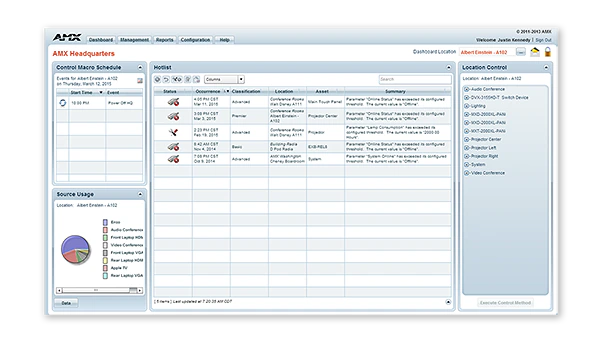
RMS Enterprise is scalable client/server based software for IT and AV managers that provides remote management capabilities for AV assets and building systems. The software features a user-friendly dashboard making it easy to centralize the management and monitoring of AV equipment, lights, HVAC and other building functions. This allows end users to proactively maintain AV displays before a bulb burns out or receive immediate notification when a device goes offline. IT and AV managers can improve their response times and end users will reduce the amount of lost productivity while waiting for meeting room equipment to function. For integrators, RMS Enterprise natively supports the AMX Standard NetLinx API (SNAPI) which greatly simplifies adding control and monitoring to any RMS system. In order to ensure your RMS software is always updated with the latest feature enhancements plus access to AMX's top-tier Technical Support team with in-depth knowledge of RMS, AMX offers a RMS Software Maintenance Agreement (RMS SMA) for RMS Enterprise. Available in one-year increments, this renewable service plan provides organizations with a maintenance program that makes it easy to keep RMS current combined with AMX Technical Support. For more details, visit www.amx.com/products/RMS-ENT-SMA.asp.

RMS Enterprise also features the RMS Enterprise Scheduling Interface, which improves the efficiency of meeting spaces and technology by allowing users and support personnel to schedule meeting spaces, preconfigures room technology for upcoming meetings.

RMS Enterprise provides web pages allowing a mobile device web browser to see a listing of the current day's events for a given location. A new global system configuration page allows the RMS administrator to enable or disable the mobile scheduling web application feature globally.

If you wish to take advantage of all the benefits and features of RMS application without installing and managing the physical server infrastructure, please try RMS Enterprise Hosted Cloud Service.

COMMON APPLICATIONS
Resource Management Suite Enterprise is a robust solution for IT and AV managers to centralize the monitoring and management of AV devices and building systems across a campus or facilities worldwide.

FEATURES

  • Centralize Support – Large scale management for users, roles, and, tracking user activities including an audit trail of who performed each activity and when it was completed
  • Improve Productivity – Prevent equipment problems which interrupt a meeting or event, the Calendaring and Scheduling functions allow the system to be pre-configured for meeting start and end times, thereby eliminating the time typically spent on equipment setup
  • Rapid Project Maker Native Support – In RPM, the commissioning of an AMX system that includes RMS is simple as a check box and typing an RMS URL
  • Reduce Energy Costs by automatically returning equipment to its lowest energy usage state upon the meeting's end. Room efficiency is maximized by RMS' ability to end meetings early based on room occupancy, thereby freeing other users to schedule the available space
  • View Daily Schedule From Mobile Devices – Utilize RMS QRS Quick Response Scheduling to display a room schedule on a mobile device, providing an effective low cost method for managing room scheduling and increasing productivity

DEALER BENEFITS

  • Easy to Integrate Devices - RMS Enterprise natively supports the Standard NetLinx API (SNAPI) which greatly simplifies adding control and monitoring to any RMS system
  • Remote Monitoring - Dealers have the option of providing remote support through network access to a customer's system
  • RMS 3.3 Compatible - Your RMS 3.3 customers can upgrade to RMS Enterprise and gain new management features without making code changes

CUSTOMER BENEFITS

  • Scalable - May be used in a multi-server deployment such as a web farm for scalability, redundancy and load balancing
  • Rich Web Application - Centralized Dashboard provides real time system updates, monitors device status, energy usage with the look and feel of a desktop application
  • Energy Management - Track usage from building to device level, and automatically turn off devices in rooms not in use
  • Software Maintenance Agreement - Provides top-tier technical support, cost savings and easy budget management

ADDITIONAL FEATURES

  • Enterprise Security Features - Software supports Authentication, Encryption and Cross-Site Scripting to prevent security threats
  • LDAP User Management - LDAP protocol provides user management, authentication required by large enterprises
  • Service Oriented Architecture - (SOA) model provides web services for client communications over well-known ports
  • Reporting - Report manager lets you select the metrics and define summaries with graphs and charts, and can be exported direct into MSWord, MSExcel, MSPowerPoint, RTF, CSV, PDF and HTML

SPECIFICATIONS

SERVER HARDWARE REQUIREMENTS

  • Processor: Dual core Intel Xeon processor @ 2.67GHz (or equivalent)
  • Memory: 4 GB
  • Display: 1280 x 1024 resolution
  • Hard Disk: 1 GB available space for RMS Enterprise application files. (Note: Database size varies depending on the installation.)

SUPPORTED SERVER OPERATING SYSTEMS

  • Microsoft Windows 2003 Server (with SP2):
    • Web Edition
    • Standard Edition / Standard x64 Edition
    • Enterprise Edition / Enterprise x64 Edition
  • Microsoft Windows 2003 Server R2:
    • Standard Edition / Standard x64 Edition
    • Enterprise Edition / Enterprise x64 Edition
  • Microsoft Windows 2008 Server (x86 and x64):
    • Web Edition
    • Standard Edition
    • Enterprise Edition

ADDITIONAL SERVER SOFTWARE REQUIREMENTS

  • Java: Java 6 Runtime Environment (SUN JRE 6.0) required.
  • Tomcat: Tomcat v6 required - version 7 is not supported.

Note: The following applications are not required on the server, but would be needed in order to view the RMS UI and help files directly on the server.

  • Internet Explorer v8 or v9
  • Adobe Flash v10
  • Adobe Acrobat Reader

SUPPORTED SERVER OS LANGUAGES

  • Arabic
  • Chinese (Simplified, PRC)
  • Chinese (Classic, HK)
  • Flemish (Dutch)
  • English
  • French
  • German
  • Greek
  • Italian
  • Japanese
  • Portuguese (Portugal)
  • Russian
  • Spanish
  • Turkish

SUPPORTED DATABASE PLATFORMS

  • Microsoft SQL Server 2008 Enterprise Edition x86
  • Microsoft SQL Server 2008 Standard Edition x86
  • Microsoft SQL Server 2008 Express Edition x86
  • Microsoft SQL Server 2008 R2 Enterprise Edition x64
  • Microsoft SQL Server 2008 R2 Standard Edition x64
  • Microsoft SQL Server 2008 R2 Express Edition x64

NOTE: The "Express Editions" are suitable for systems with less than 50 rooms only (download available free from Microsoft).

In this example, an RMS User can log into the RMS Server remotely and manage or monitor rooms in multiple building across a campus or globally.


(Click here for larger PDF image)

TRAINING AVAILABLE
Learn important installation, configuration and programming techniques in the following course(s) from AMX University:

  • Getting Started with RMS Enterprise, RMS Configuration & Programming

For schedules and registration for these and any AMX University courses, visit www.amx.com/training.

NAME DESCRIPTION PART #
RMS-SCH-EWS RMS Enterprise Interface for Microsoft Exchange Web Services (EWS) (FG3004-31)
RMS-SCH-LN RMS Enterprise Interface for Lotus Notes Domino (FG3004-32)
RMS-ENT-QR RMS QRS Quick Response Scheduling (FG3004-51)
ANT-RDR Anterus Reader (FG5172)
ANT-TAG Anterus Tag (FG5172-01)
ANT-BDG Anterus Badge (FG5172-02)
Feedback | Gear Store | Site Map | Terms & Conditions | Warranty