RMS-ENT

RMS Enterprise

RMS-ENT
Hình ảnh lớn hơn

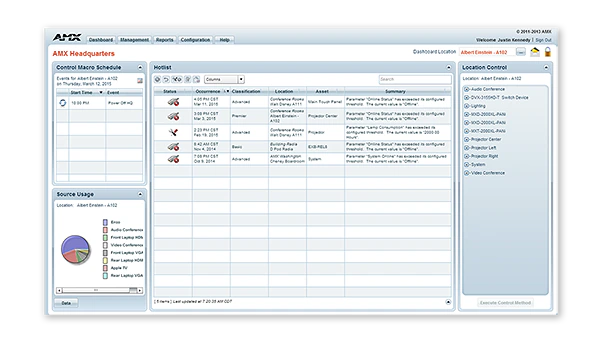
RMS-ENT / RMS Enterprise là phần mềm dựa trên kiến trúc client/server có khả năng mở rộng dành cho các nhà quản lý IT và AV, cung cấp khả năng quản lý từ xa các tài sản AV và hệ thống tòa nhà. Phần mềm có giao diện bảng điều khiển thân thiện với người dùng, giúp dễ dàng tập trung hóa quản lý và giám sát thiết bị AV, đèn, HVAC và các chức năng tòa nhà khác. Điều này cho phép người dùng giải quyết các vấn đề công nghệ trước khi chúng trở thành sự cố, chẳng hạn như phát hiện màn hình trước khi bóng đèn cháy hoặc nhận thông báo ngay lập tức khi một thiết bị mất kết nối.

Với RMS, các nhà quản lý IT và AV có thể cải thiện thời gian phản hồi, trong khi người dùng cuối có thể giảm thời gian chờ để thiết bị phòng họp hoạt động. Với RMS Enterprise Update Manager mới, các nhà quản lý IT và AV hiện có khả năng chuẩn bị firmware AMX mới, nhanh chóng xác định các thiết bị AMX không cập nhật lên phiên bản firmware mới nhất, và triển khai hàng loạt firmware mới cho các thiết bị này cùng một lúc chỉ với vài cú nhấp chuột. RMS cũng là một giải pháp xanh tiết kiệm tiền bạc và bảo vệ môi trường bằng cách giảm tiêu thụ năng lượng thông qua tắt từ xa thiết bị khi phòng trống hoặc vào cuối ngày làm việc.

RMS có đầy đủ các tính năng mà các chuyên gia IT sẽ mong đợi từ phần mềm cấp doanh nghiệp, bao gồm hỗ trợ active directory, LDAP, cơ sở dữ liệu SQL hiện tại, và khả năng mở rộng trên nhiều máy chủ. Bạn có thể quản lý tất cả các tòa nhà của mình bằng một giấy phép RMS duy nhất, có thể triển khai từ đám mây hoặc tại chỗ. Xem RMS Enterprise Hosted Cloud Service để biết chi tiết về phiên bản đám mây.

RMS bao gồm một danh sách dài các báo cáo tiêu chuẩn và có thể tùy chỉnh, và cung cấp khả năng tùy chỉnh trải nghiệm của bạn bằng bảng điều khiển có thể định cấu hình đầy đủ với các tiện ích dễ sử dụng. RMS Enterprise cũng có Giao diện Lập lịch RMS Enterprise, giúp cải thiện hiệu quả của các không gian họp và công nghệ bằng cách cho phép người dùng và nhân viên hỗ trợ lên lịch các không gian họp và cấu hình trước công nghệ phòng cho các cuộc họp sắp tới.

Thêm Chi tiết

  • RMS is a robust solution for corporate or government IT and AV managers to centralize the monitoring and management of AV devices and building systems across their facilities worldwide.
  • RMS is popular among support staff at higher education institutions for managing classroom AV technology
  • RMS is ideal for organizations deploying conference room and classroom scheduling throughout their facilities

Tải xuống

Tài liệu
  Kích thước Đã tải lên
file type icon Data Sheet
cập nhật: Thg 4 2026
300 KB Thg 4 2026
Manuals
  Kích thước Đã tải lên
7 MB Thg 5 2020
Software
  Phiên bản Kích thước Đã tải lên
download icon for RMS Client/SDK RMS Client/SDK
phiên bản 4.7.21, phát hành: Thg 9 2024
4.7.21   30 MB Thg 9 2024
download icon for RMS Enterprise Transporter RMS Enterprise Transporter
phiên bản 1.2.25, phát hành: Thg 5 2020
1.2.25   90 MB Thg 5 2020
download icon for RMS Enterprise Software Development Kit – NX Series RMS Enterprise Software Development Kit – NX Series
phiên bản 4.6.7, phát hành: Thg 3 2018
4.6.7   30 MB Thg 3 2018
download icon for RMS Enterprise Scheduling Interface RMS Enterprise Scheduling Interface
phiên bản 4.1.22, phát hành: Thg 3 2018
4.1.22   1 MB Thg 3 2018
download icon for RMS Enterprise Interface for Lotus Notes Domino RMS Enterprise Interface for Lotus Notes Domino
phiên bản 4.1.5, phát hành: Thg 3 2018
4.1.5   3 MB Thg 3 2018
download icon for Resource Management Suite Enterprise Resource Management Suite Enterprise
phiên bản 4.8.7, cập nhật: Thg 12 2025
4.8.7   400 MB Thg 12 2025
Administrators Guides
  Kích thước Đã tải lên
20 MB Thg 5 2020
Application Guides
  Kích thước Đã tải lên
file type icon AMX Scheduling Application Guide
cập nhật: Thg 10 2020
300 KB Thg 10 2020
Quick Reference Guides
  Kích thước Đã tải lên
file type icon Reference Guide - RMS-ENT Scheduling API
cập nhật: Thg 3 2018
300 KB Thg 3 2018
User Guides
  Kích thước Đã tải lên
700 KB Thg 3 2018
1 MB Thg 3 2018
Programming Guides
  Kích thước Đã tải lên
3 MB Thg 3 2018
3 MB Thg 3 2018
Install Guides
  Kích thước Đã tải lên
5 MB Thg 10 2020
Whitepapers
  Kích thước Đã tải lên
3 MB Thg 10 2020

Nếu bất kỳ liên kết nào ở trên hiển thị ký tự lạ trong trình duyệt của bạn, vui lòng nhấp chuột phải vào tệp để lưu vào máy tính của bạn.

Tính năng

  • Monitor and Maintain – Minimize help desk calls and simplify troubleshooting by centrally managing AV systems just like IT systems
  • Reports and Dashboards – RMS includes the industry’s most versatile set of configurable reports and dashboards, allowing organizations to customize the performance metrics they want to view, when they want to view them
  • Enterprise Grade Software – RMS Enterprise provides large scale management for users, roles, and, tracking user activities including an audit trail of who performed each activity and when it was completed. The server software supports authentication, encryption and protection from cross-site scripting to prevent security threats.
  • Schedule Conference Rooms & Classrooms – Improve productivity by enabling users to check availability and schedule rooms directly from their desks, or from touch panels mounted outside of the rooms. RMS Enterprise Scheduling supports the major third-party Scheduling systems like Outlook, Google Calendar and Lotus Notes, and includes an API that gives flexibility to add tailored support for any scheduling application whether 3rd party or developed by the customer
  • View Room Schedules From Mobile Devices – Utilize RMS QRS Quick Response Scheduling to display a room schedule on a mobile device, providing an effective low cost method for managing room scheduling and increasing productivity
  • Simultaneously Deploy Firmware Files Over The Network – Save time and cost while eliminating the need for technicians to make on-site visits
  • Maintain Version Information & Update History For All AMX Devices – Simplifies record keeping and ensures optimal performance of AMX devices
  • Reduce Energy Costs by automatically returning equipment to its lowest energy usage state upon the meeting's end, or by remotely shutting down equipment at the end of the day
  • Rapid Project Maker Native Support – In RPM, the commissioning of an AMX system that includes RMS is simple as a check box and typing an RMS URL

Thông số kỹ thuật

Server Hardware Requirements Processor: Dual core Intel Xeon processor @ 2.67GHz (or equivalent) Memory: 8 GB Display: 1280 x 1024 resolution Hard Disk: 1 GB available space for RMS Enterprise application files; an additional 20 GB of space is needed for log files and firmware files.
Supported Server Operating Systems

Microsoft Windows Server 2019, Microsoft Windows Server 2012 SP2 (x64), Microsoft Windows 2008 Server R2 (x64). See Data Sheet for details.

Supported Virtual Servers RMS Enterprise can also be hosted on a virtual server with either of the following virtualization systems: VMware ESXi (4.x or greater), Hyper-V
Supported SQL Database Platforms (x32/x64, Enterprise/Standard/Express). The "Express Editions" are suitable for systems with less than 50 rooms only (download available free from Microsoft)
FG Numbers

FG3004-K (1000 Location Licenses, and 3 Year Maintenance)
FG3004-1000K (1000 Location Licenses, Server License not included)
FG3004-01 (Single Location License - Discontinued)
FG3004-25K (25 Location License Bundle - Discontinued)
FG3004-100K (100 Location License Bundle - Discontinued)
FG3004-300K (300 Location License Bundle - Discontinued)
FG3004-25EK (Education Discount 25 Location License Bundle - Disontinued)
FG3004-100EK (Education Discount 100 Location License Bundle - Discontinued)
FG3004-300EK (Education Discount 300 Location License Bundle - Discontined)