RMS-ENT

RMS 엔터프라이즈

RMS-ENT
큰 이미지

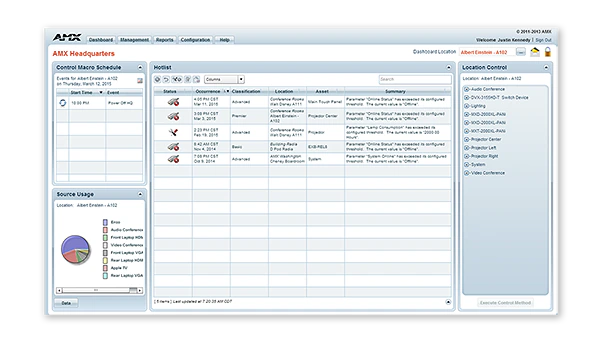
RMS-ENT / RMS Enterprise is scalable client/server based software for IT and AV managers that provides remote management capabilities for AV assets and building systems. The software features a user-friendly dashboard that makes it easy to centralize the management and monitoring of AV equipment, lights, HVAC and other building functions. This allows users to solve technology issues before they become problems, such as identifying displays before a bulb burns out or receiving immediate notification when a device goes offline.

With RMS, IT and AV managers can improve their response times, while end users can reduce the amount of time lost while waiting for meeting room equipment to function. With the new RMS Enterprise Update Manager, IT and AV Managers now have the ability to stage new AMX firmware, quickly identify AMX devices that are not up to the latest firmware revision, and mass deploy the new firmware to these devices simultaneously with just a few clicks of the mouse. RMS is also a green solution that saves money and the environment by reducing energy consumption by remotely turning off equipment when rooms are empty or at the end of the work day.

RMS has the full range of features IT professionals would expect for enterprise software, including support for active directory, LDAP, existing SQL databases, and scalability across multiple servers. You can manage all of your buildings with a single RMS license, deployable from the cloud or on-premises. See RMS Enterprise Hosted Cloud Service for details on the cloud version.

RMS includes a long list of standard and customizable reports, and gives you the ability to tailor your experience with a fully-configurable dashboard with easy-to-use widgets. RMS Enterprise also features the RMS Enterprise Scheduling Interface, which improves the efficiency of meeting spaces and technology by allowing users and support personnel to schedule meeting spaces and preconfigure room technology for upcoming meetings.

더 알아보기

  • RMS is a robust solution for corporate or government IT and AV managers to centralize the monitoring and management of AV devices and building systems across their facilities worldwide.
  • RMS is popular among support staff at higher education institutions for managing classroom AV technology
  • RMS is ideal for organizations deploying conference room and classroom scheduling throughout their facilities

다운로드

문서
  크기 업로드 날짜
file type icon Data Sheet
업데이트: 2026년 4월
304KB 2026년 4월
Manuals
  크기 업로드 날짜
7.29MB 2020년 5월
Software
  버전 크기 업로드 날짜
download icon for RMS Client/SDK RMS Client/SDK
버전 4.7.21, 출시: 2024년 9월
4.7.21   33MB 2024년 9월
download icon for RMS Enterprise Transporter RMS Enterprise Transporter
버전 1.2.25, 출시: 2020년 5월
1.2.25   90MB 2020년 5월
download icon for RMS Enterprise Software Development Kit – NX Series RMS Enterprise Software Development Kit – NX Series
버전 4.6.7, 출시: 2018년 3월
4.6.7   32.2MB 2018년 3월
download icon for RMS Enterprise Scheduling Interface RMS Enterprise Scheduling Interface
버전 4.1.22, 출시: 2018년 3월
4.1.22   1.36MB 2018년 3월
download icon for RMS Enterprise Interface for Lotus Notes Domino RMS Enterprise Interface for Lotus Notes Domino
버전 4.1.5, 출시: 2018년 3월
4.1.5   3.27MB 2018년 3월
download icon for Resource Management Suite Enterprise Resource Management Suite Enterprise
버전 4.8.7, 업데이트: 2025년 12월
4.8.7   388MB 2025년 12월
Administrators Guides
  크기 업로드 날짜
21.9MB 2020년 5월
Application Guides
  크기 업로드 날짜
file type icon AMX Scheduling Application Guide
업데이트: 2020년 10월
328KB 2020년 10월
Quick Reference Guides
  크기 업로드 날짜
file type icon Reference Guide - RMS-ENT Scheduling API
업데이트: 2018년 3월
303KB 2018년 3월
User Guides
  크기 업로드 날짜
682KB 2018년 3월
1.47MB 2018년 3월
Programming Guides
  크기 업로드 날짜
2.66MB 2018년 3월
2.68MB 2018년 3월
Install Guides
  크기 업로드 날짜
4.67MB 2020년 10월
Whitepapers
  크기 업로드 날짜
2.9MB 2020년 10월

위의 링크 중 하나에서 브라우저에 이상한 문자가 표시되면, 파일을 마우스 오른쪽 버튼으로 클릭하여 컴퓨터에 저장하세요.

특징

  • Monitor and Maintain – Minimize help desk calls and simplify troubleshooting by centrally managing AV systems just like IT systems
  • Reports and Dashboards – RMS includes the industry’s most versatile set of configurable reports and dashboards, allowing organizations to customize the performance metrics they want to view, when they want to view them
  • Enterprise Grade Software – RMS Enterprise provides large scale management for users, roles, and, tracking user activities including an audit trail of who performed each activity and when it was completed. The server software supports authentication, encryption and protection from cross-site scripting to prevent security threats.
  • Schedule Conference Rooms & Classrooms – Improve productivity by enabling users to check availability and schedule rooms directly from their desks, or from touch panels mounted outside of the rooms. RMS Enterprise Scheduling supports the major third-party Scheduling systems like Outlook, Google Calendar and Lotus Notes, and includes an API that gives flexibility to add tailored support for any scheduling application whether 3rd party or developed by the customer
  • View Room Schedules From Mobile Devices – Utilize RMS QRS Quick Response Scheduling to display a room schedule on a mobile device, providing an effective low cost method for managing room scheduling and increasing productivity
  • Simultaneously Deploy Firmware Files Over The Network – Save time and cost while eliminating the need for technicians to make on-site visits
  • Maintain Version Information & Update History For All AMX Devices – Simplifies record keeping and ensures optimal performance of AMX devices
  • Reduce Energy Costs by automatically returning equipment to its lowest energy usage state upon the meeting's end, or by remotely shutting down equipment at the end of the day
  • Rapid Project Maker Native Support – In RPM, the commissioning of an AMX system that includes RMS is simple as a check box and typing an RMS URL

사양

Server Hardware Requirements Processor: Dual core Intel Xeon processor @ 2.67GHz (or equivalent) Memory: 8 GB Display: 1280 x 1024 resolution Hard Disk: 1 GB available space for RMS Enterprise application files; an additional 20 GB of space is needed for log files and firmware files.
Supported Server Operating Systems

Microsoft Windows Server 2019, Microsoft Windows Server 2012 SP2 (x64), Microsoft Windows 2008 Server R2 (x64). See Data Sheet for details.

Supported Virtual Servers RMS Enterprise can also be hosted on a virtual server with either of the following virtualization systems: VMware ESXi (4.x or greater), Hyper-V
Supported SQL Database Platforms (x32/x64, Enterprise/Standard/Express). The "Express Editions" are suitable for systems with less than 50 rooms only (download available free from Microsoft)
FG Numbers

FG3004-K (1000 Location Licenses, and 3 Year Maintenance)
FG3004-1000K (1000 Location Licenses, Server License not included)
FG3004-01 (Single Location License - Discontinued)
FG3004-25K (25 Location License Bundle - Discontinued)
FG3004-100K (100 Location License Bundle - Discontinued)
FG3004-300K (300 Location License Bundle - Discontinued)
FG3004-25EK (Education Discount 25 Location License Bundle - Disontinued)
FG3004-100EK (Education Discount 100 Location License Bundle - Discontinued)
FG3004-300EK (Education Discount 300 Location License Bundle - Discontined)

HARMAN Professional Solutions: