RMS-ENT

RMS Enterprise

RMS-ENT
Gambar Lebih Besar

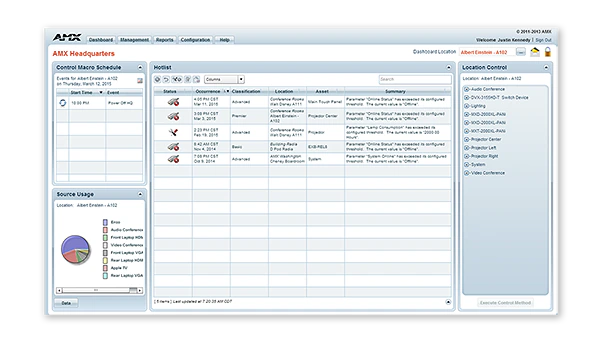
RMS-ENT / RMS Enterprise adalah perangkat lunak berbasis klien/server yang dapat diskalakan untuk manajer IT dan AV yang menyediakan kemampuan manajemen jarak jauh untuk aset AV dan sistem bangunan. Perangkat lunak ini menampilkan dasbor yang ramah pengguna yang memudahkan sentralisasi manajemen dan pemantauan peralatan AV, pencahayaan, HVAC, dan fungsi bangunan lainnya. Hal ini memungkinkan pengguna menyelesaikan masalah teknologi sebelum menjadi masalah, seperti mengidentifikasi tampilan sebelum bohlam terbakar atau menerima pemberitahuan segera saat perangkat offline.

Dengan RMS, manajer IT dan AV dapat meningkatkan waktu respons mereka, sementara pengguna akhir dapat mengurangi waktu yang hilang sambil menunggu peralatan ruang rapat berfungsi. Dengan RMS Enterprise Update Manager yang baru, Manajer IT dan AV kini memiliki kemampuan untuk mempersiapkan firmware AMX baru, dengan cepat mengidentifikasi perangkat AMX yang tidak menggunakan revisi firmware terbaru, dan menyebarkan massal firmware baru ke perangkat tersebut secara bersamaan hanya dengan beberapa klik mouse. RMS juga merupakan solusi ramah lingkungan yang menghemat uang dan lingkungan dengan mengurangi konsumsi energi melalui pemadaman peralatan secara jarak jauh ketika ruangan kosong atau di akhir hari kerja.

RMS memiliki rangkaian lengkap fitur yang diharapkan profesional IT untuk perangkat lunak enterprise, termasuk dukungan untuk active directory, LDAP, database SQL yang sudah ada, dan skalabilitas di seluruh multiple server. Anda dapat mengelola semua bangunan Anda dengan satu lisensi RMS, dapat disebarkan dari cloud atau on-premises. Lihat RMS Enterprise Hosted Cloud Service untuk detail versi cloud.

RMS mencakup daftar panjang laporan standar dan dapat disesuaikan, serta memberikan Anda kemampuan untuk menyesuaikan pengalaman Anda dengan dasbor yang dapat dikonfigurasi sepenuhnya dengan widget yang mudah digunakan. RMS Enterprise juga menampilkan RMS Enterprise Scheduling Interface, yang meningkatkan efisiensi ruang rapat dan teknologi dengan memungkinkan pengguna dan staf dukungan menjadwalkan ruang rapat dan mengonfigurasi sebelumnya teknologi ruangan untuk rapat mendatang.

Keterangan Lebih Lanjut

  • RMS is a robust solution for corporate or government IT and AV managers to centralize the monitoring and management of AV devices and building systems across their facilities worldwide.
  • RMS is popular among support staff at higher education institutions for managing classroom AV technology
  • RMS is ideal for organizations deploying conference room and classroom scheduling throughout their facilities

Unduhan

Dokumen
  Ukuran Diunggah
file type icon Data Sheet
diperbarui: Apr 2026
304 KB Apr 2026
Manuals
  Ukuran Diunggah
7,29 MB Mei 2020
Software
  Versi Ukuran Diunggah
download icon for RMS Client/SDK RMS Client/SDK
versi 4.7.21, dirilis: Sep 2024
4.7.21   33 MB Sep 2024
download icon for RMS Enterprise Transporter RMS Enterprise Transporter
versi 1.2.25, dirilis: Mei 2020
1.2.25   90 MB Mei 2020
4.6.7   32,2 MB Mar 2018
download icon for RMS Enterprise Scheduling Interface RMS Enterprise Scheduling Interface
versi 4.1.22, dirilis: Mar 2018
4.1.22   1,36 MB Mar 2018
download icon for RMS Enterprise Interface for Lotus Notes Domino RMS Enterprise Interface for Lotus Notes Domino
versi 4.1.5, dirilis: Mar 2018
4.1.5   3,27 MB Mar 2018
download icon for Resource Management Suite Enterprise Resource Management Suite Enterprise
versi 4.8.7, diperbarui: Des 2025
4.8.7   388 MB Des 2025
Administrators Guides
  Ukuran Diunggah
21,9 MB Mei 2020
Application Guides
  Ukuran Diunggah
file type icon AMX Scheduling Application Guide
diperbarui: Okt 2020
328 KB Okt 2020
Quick Reference Guides
  Ukuran Diunggah
303 KB Mar 2018
User Guides
  Ukuran Diunggah
682 KB Mar 2018
1,47 MB Mar 2018
Programming Guides
  Ukuran Diunggah
2,66 MB Mar 2018
2,68 MB Mar 2018
Install Guides
  Ukuran Diunggah
4,67 MB Okt 2020
Whitepapers
  Ukuran Diunggah
2,9 MB Okt 2020

Jika ada tautan di atas yang menampilkan karakter aneh di browser Anda, klik kanan file tersebut untuk menyimpannya ke komputer Anda.

Fitur

  • Monitor and Maintain – Minimize help desk calls and simplify troubleshooting by centrally managing AV systems just like IT systems
  • Reports and Dashboards – RMS includes the industry’s most versatile set of configurable reports and dashboards, allowing organizations to customize the performance metrics they want to view, when they want to view them
  • Enterprise Grade Software – RMS Enterprise provides large scale management for users, roles, and, tracking user activities including an audit trail of who performed each activity and when it was completed. The server software supports authentication, encryption and protection from cross-site scripting to prevent security threats.
  • Schedule Conference Rooms & Classrooms – Improve productivity by enabling users to check availability and schedule rooms directly from their desks, or from touch panels mounted outside of the rooms. RMS Enterprise Scheduling supports the major third-party Scheduling systems like Outlook, Google Calendar and Lotus Notes, and includes an API that gives flexibility to add tailored support for any scheduling application whether 3rd party or developed by the customer
  • View Room Schedules From Mobile Devices – Utilize RMS QRS Quick Response Scheduling to display a room schedule on a mobile device, providing an effective low cost method for managing room scheduling and increasing productivity
  • Simultaneously Deploy Firmware Files Over The Network – Save time and cost while eliminating the need for technicians to make on-site visits
  • Maintain Version Information & Update History For All AMX Devices – Simplifies record keeping and ensures optimal performance of AMX devices
  • Reduce Energy Costs by automatically returning equipment to its lowest energy usage state upon the meeting's end, or by remotely shutting down equipment at the end of the day
  • Rapid Project Maker Native Support – In RPM, the commissioning of an AMX system that includes RMS is simple as a check box and typing an RMS URL

Spesifikasi

Server Hardware Requirements Processor: Dual core Intel Xeon processor @ 2.67GHz (or equivalent) Memory: 8 GB Display: 1280 x 1024 resolution Hard Disk: 1 GB available space for RMS Enterprise application files; an additional 20 GB of space is needed for log files and firmware files.
Supported Server Operating Systems

Microsoft Windows Server 2019, Microsoft Windows Server 2012 SP2 (x64), Microsoft Windows 2008 Server R2 (x64). See Data Sheet for details.

Supported Virtual Servers RMS Enterprise can also be hosted on a virtual server with either of the following virtualization systems: VMware ESXi (4.x or greater), Hyper-V
Supported SQL Database Platforms (x32/x64, Enterprise/Standard/Express). The "Express Editions" are suitable for systems with less than 50 rooms only (download available free from Microsoft)
FG Numbers

FG3004-K (1000 Location Licenses, and 3 Year Maintenance)
FG3004-1000K (1000 Location Licenses, Server License not included)
FG3004-01 (Single Location License - Discontinued)
FG3004-25K (25 Location License Bundle - Discontinued)
FG3004-100K (100 Location License Bundle - Discontinued)
FG3004-300K (300 Location License Bundle - Discontinued)
FG3004-25EK (Education Discount 25 Location License Bundle - Disontinued)
FG3004-100EK (Education Discount 100 Location License Bundle - Discontinued)
FG3004-300EK (Education Discount 300 Location License Bundle - Discontined)

HARMAN Professional Solutions: