RMS-ENT

RMS Enterprise

Größere Bilder

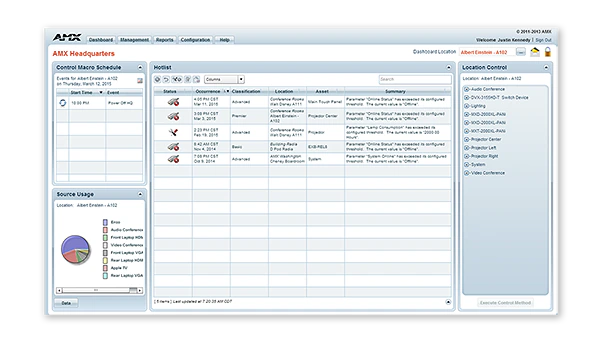
RMS-ENT / RMS Enterprise is scalable client/server based software for IT and AV managers that provides remote management capabilities for AV assets and building systems. The software features a user-friendly dashboard that makes it easy to centralize the management and monitoring of AV equipment, lights, HVAC and other building functions. This allows users to solve technology issues before they become problems, such as identifying displays before a bulb burns out or receiving immediate notification when a device goes offline.

With RMS, IT and AV managers can improve their response times, while end users can reduce the amount of time lost while waiting for meeting room equipment to function. With the new RMS Enterprise Update Manager, IT and AV Managers now have the ability to stage new AMX firmware, quickly identify AMX devices that are not up to the latest firmware revision, and mass deploy the new firmware to these devices simultaneously with just a few clicks of the mouse. RMS is also a green solution that saves money and the environment by reducing energy consumption by remotely turning off equipment when rooms are empty or at the end of the work day.

RMS has the full range of features IT professionals would expect for enterprise software, including support for active directory, LDAP, existing SQL databases, and scalability across multiple servers. You can manage all of your buildings with a single RMS license, deployable from the cloud or on-premises. See RMS Enterprise Hosted Cloud Service for details on the cloud version.

RMS includes a long list of standard and customizable reports, and gives you the ability to tailor your experience with a fully-configurable dashboard with easy-to-use widgets. RMS Enterprise also features the RMS Enterprise Scheduling Interface, which improves the efficiency of meeting spaces and technology by allowing users and support personnel to schedule meeting spaces and preconfigure room technology for upcoming meetings.

Mehr Details

  • RMS is a robust solution for corporate or government IT and AV managers to centralize the monitoring and management of AV devices and building systems across their facilities worldwide.
  • RMS is popular among support staff at higher education institutions for managing classroom AV technology
  • RMS is ideal for organizations deploying conference room and classroom scheduling throughout their facilities

Downloads

Dokumente
  Größe Hochgeladen
file type icon Data Sheet
aktualisiert: Apr 2026
304 KB Apr 2026
Manuals
  Größe Hochgeladen
7,29 MB Mai 2020
Software
  Version Größe Hochgeladen
download icon for RMS Client/SDK RMS Client/SDK
Version 4.7.21, veröffentlicht: Sep 2024
4.7.21   33 MB Sep 2024
download icon for RMS Enterprise Transporter RMS Enterprise Transporter
Version 1.2.25, veröffentlicht: Mai 2020
1.2.25   90 MB Mai 2020
download icon for RMS Enterprise Software Development Kit – NX Series RMS Enterprise Software Development Kit – NX Series
Version 4.6.7, veröffentlicht: Mär 2018
4.6.7   32,2 MB Mär 2018
download icon for RMS Enterprise Scheduling Interface RMS Enterprise Scheduling Interface
Version 4.1.22, veröffentlicht: Mär 2018
4.1.22   1,36 MB Mär 2018
download icon for RMS Enterprise Interface for Lotus Notes Domino RMS Enterprise Interface for Lotus Notes Domino
Version 4.1.5, veröffentlicht: Mär 2018
4.1.5   3,27 MB Mär 2018
download icon for Resource Management Suite Enterprise Resource Management Suite Enterprise
Version 4.8.7, aktualisiert: Dez 2025
4.8.7   388 MB Dez 2025
Administrators Guides
  Größe Hochgeladen
21,9 MB Mai 2020
Application Guides
  Größe Hochgeladen
file type icon AMX Scheduling Application Guide
aktualisiert: Okt 2020
328 KB Okt 2020
Quick Reference Guides
  Größe Hochgeladen
303 KB Mär 2018
User Guides
  Größe Hochgeladen
682 KB Mär 2018
1,47 MB Mär 2018
Programming Guides
  Größe Hochgeladen
2,66 MB Mär 2018
2,68 MB Mär 2018
Install Guides
  Größe Hochgeladen
4,67 MB Okt 2020
Whitepapers
  Größe Hochgeladen
2,9 MB Okt 2020

Falls einer der obigen Links zu seltsamen Zeichen in Ihrem Browser führt, klicken Sie bitte mit der rechten Maustaste auf die Datei, um sie auf Ihrem Computer zu speichern.

Eigenschaften

  • Überwachen und Warten – Reduzieren Sie Help-Desk-Anfragen und vereinfachen Sie die Fehlerbehebung durch zentrale Verwaltung von AV-Systemen wie IT-Systemen
  • Berichte und Dashboards – RMS bietet die branchenweit vielseitigste Palette konfigurierbarer Berichte und Dashboards, die es Unternehmen ermöglichen, die Leistungskennzahlen anzupassen, die sie anzeigen möchten, wann immer sie diese anzeigen möchten
  • Software auf Unternehmensebene – RMS Enterprise ermöglicht die großflächige Verwaltung von Benutzern, Rollen und die Verfolgung von Benutzeraktivitäten, einschließlich eines Audit-Protokolls, das zeigt, wer jede Aktivität ausgeführt hat und wann sie abgeschlossen wurde. Die Server-Software unterstützt Authentifizierung, Verschlüsselung und Schutz vor Cross-Site-Scripting, um Sicherheitsbedrohungen zu verhindern.
  • Konferenzräume und Klassenzimmer planen – Erhöhen Sie die Produktivität, indem Sie Benutzern ermöglichen, Verfügbarkeit zu prüfen und Räume direkt von ihren Schreibtischen oder von Touchpanels außerhalb der Räume zu buchen. RMS Enterprise Scheduling unterstützt führende Drittanbieter-Planungssysteme wie Outlook, Google Calendar und Lotus Notes und enthält eine API, die Flexibilität für maßgeschneiderte Unterstützung für jede Planungsanwendung bietet, ob von Drittanbietern oder vom Kunden entwickelt
  • Raumzeitpläne auf mobilen Geräten anzeigen – Nutzen Sie RMS QRS Quick Response Scheduling, um einen Raumzeitplan auf einem mobilen Gerät anzuzeigen und bieten Sie eine effektive kostengünstige Methode zur Verwaltung der Raumplanung und Steigerung der Produktivität
  • Firmware-Dateien gleichzeitig über das Netzwerk bereitstellen – Sparen Sie Zeit und Kosten und eliminieren Sie die Notwendigkeit für Techniker, vor Ort vorbeizukommen
  • Versionsinformationen und Update-Verlauf für alle AMX-Geräte verwalten – Vereinfacht die Dokumentation und gewährleistet optimale Leistung von AMX-Geräten
  • Energiekosten reduzieren, indem Sie Geräte automatisch nach Beendigung des Meetings in den Zustand mit dem niedrigsten Energieverbrauch zurückversetzen oder Geräte am Ende des Tages remote ausschalten
  • Native Unterstützung für Rapid Project Maker – In RPM ist die Inbetriebnahme eines AMX-Systems mit RMS so einfach wie ein Häkchen setzen und eine RMS-URL eingeben

Spezifikationen

Server Hardware Requirements Processor: Dual core Intel Xeon processor @ 2.67GHz (or equivalent) Memory: 8 GB Display: 1280 x 1024 resolution Hard Disk: 1 GB available space for RMS Enterprise application files; an additional 20 GB of space is needed for log files and firmware files.
Supported Server Operating Systems

Microsoft Windows Server 2019, Microsoft Windows Server 2012 SP2 (x64), Microsoft Windows 2008 Server R2 (x64). See Data Sheet for details.

Supported Virtual Servers RMS Enterprise can also be hosted on a virtual server with either of the following virtualization systems: VMware ESXi (4.x or greater), Hyper-V
Supported SQL Database Platforms (x32/x64, Enterprise/Standard/Express). The "Express Editions" are suitable for systems with less than 50 rooms only (download available free from Microsoft)
FG Numbers

FG3004-K (1000 Location Licenses, and 3 Year Maintenance)
FG3004-1000K (1000 Location Licenses, Server License not included)
FG3004-01 (Single Location License - Discontinued)
FG3004-25K (25 Location License Bundle - Discontinued)
FG3004-100K (100 Location License Bundle - Discontinued)
FG3004-300K (300 Location License Bundle - Discontinued)
FG3004-25EK (Education Discount 25 Location License Bundle - Disontinued)
FG3004-100EK (Education Discount 100 Location License Bundle - Discontinued)
FG3004-300EK (Education Discount 300 Location License Bundle - Discontined)

HARMAN Professional Solutions: