RMS-ENT

RMS 엔터프라이즈

RMS-ENT
더 큰 이미지

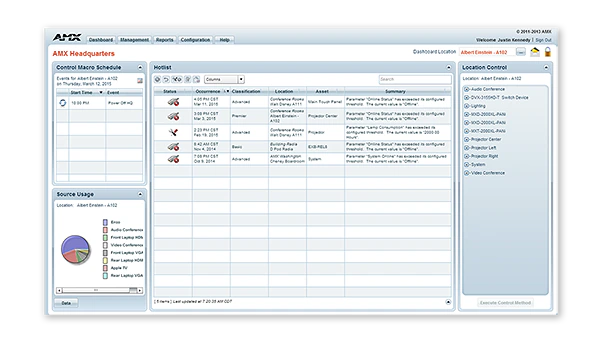
RMS-ENT / RMS Enterprise는 IT 및 AV 관리자를 위한 확장 가능한 클라이언트/서버 기반 소프트웨어로, AV 자산과 빌딩 시스템에 대한 원격 관리 기능을 제공합니다. 이 소프트웨어는 사용자 친화적인 대시보드를 갖추고 있어 AV 장비, 조명, HVAC 및 기타 빌딩 기능의 관리와 모니터링을 쉽게 중앙화할 수 있습니다. 이를 통해 사용자는 기술적 문제가 발생하기 전에 해결할 수 있습니다. 예를 들어 램프가 소진되기 전에 디스플레이를 식별하거나 장치가 오프라인 상태가 되면 즉시 알림을 받을 수 있습니다.

RMS를 통해 IT 및 AV 관리자는 응답 시간을 개선할 수 있으며, 최종 사용자는 회의실 장비가 작동하기를 기다리는 동안 손실되는 시간을 줄일 수 있습니다. 새로운 RMS Enterprise Update Manager를 사용하면 IT 및 AV 관리자는 이제 새로운 AMX 펌웨어를 준비하고, 최신 펌웨어 버전으로 업데이트되지 않은 AMX 장치를 신속하게 식별하며, 마우스 클릭 몇 번만으로 이러한 장치에 새 펌웨어를 동시에 대량 배포할 수 있습니다. RMS는 또한 회의실이 비어 있거나 업무 종료 시 장비를 원격으로 끌 수 있어 에너지 소비를 줄여 비용과 환경을 절감하는 친환경 솔루션입니다.

RMS는 IT 전문가가 엔터프라이즈 소프트웨어에 기대하는 모든 기능을 갖추고 있으며, 여기에는 액티브 디렉터리, LDAP, 기존 SQL 데이터베이스 지원 및 다중 서버 간 확장성이 포함됩니다. 단일 RMS 라이선스로 모든 건물을 관리할 수 있으며, 클라우드 또는 온프레미스에서 배포 가능합니다. 클라우드 버전에 대한 자세한 내용은 RMS Enterprise Hosted Cloud Service를 참조하십시오.

RMS에는 표준 및 사용자 정의 가능한 보고서 목록이 포함되어 있으며, 사용하기 쉬운 위젯으로 완전히 구성 가능한 대시보드를 통해 경험을 맞춤화할 수 있습니다. RMS Enterprise는 또한 RMS Enterprise Scheduling Interface를 제공하여 사용자와 지원 담당자가 회의 공간을 예약하고 향후 회의를 위해 회의실 기술을 사전 구성할 수 있도록 함으로써 회의 공간과 기술의 효율성을 향상시킵니다.

상세 정보

  • RMS is a robust solution for corporate or government IT and AV managers to centralize the monitoring and management of AV devices and building systems across their facilities worldwide.
  • RMS is popular among support staff at higher education institutions for managing classroom AV technology
  • RMS is ideal for organizations deploying conference room and classroom scheduling throughout their facilities

다운로드

문서
  크기 업로드됨
file type icon Data Sheet
업데이트됨: 2026년 4월월
304KB 2026년 4월월
Manuals
  크기 업로드됨
file type icon Installation Manual - RMS Enterprise Transporter
업데이트됨: 2020년 5월월
7.29MB 2020년 5월월
Software
  버전 크기 업로드됨
download icon for RMS Client/SDK RMS Client/SDK
버전 4.7.21, 출시: 2024년 9월월
4.7.21   33MB 2024년 9월월
download icon for RMS Enterprise Transporter RMS Enterprise Transporter
버전 1.2.25, 출시: 2020년 5월월
1.2.25   90MB 2020년 5월월
download icon for RMS Enterprise Software Development Kit – NX Series RMS Enterprise Software Development Kit – NX Series
버전 4.6.7, 출시: 2018년 3월월
4.6.7   32.2MB 2018년 3월월
download icon for RMS Enterprise Scheduling Interface RMS Enterprise Scheduling Interface
버전 4.1.22, 출시: 2018년 3월월
4.1.22   1.36MB 2018년 3월월
download icon for RMS Enterprise Interface for Lotus Notes Domino RMS Enterprise Interface for Lotus Notes Domino
버전 4.1.5, 출시: 2018년 3월월
4.1.5   3.27MB 2018년 3월월
download icon for Resource Management Suite Enterprise Resource Management Suite Enterprise
버전 4.8.7, 업데이트됨: 2025년 12월월
4.8.7   388MB 2025년 12월월
Administrators Guides
  크기 업로드됨
21.9MB 2020년 5월월
Application Guides
  크기 업로드됨
file type icon AMX Scheduling Application Guide
업데이트됨: 2020년 10월월
328KB 2020년 10월월
Quick Reference Guides
  크기 업로드됨
file type icon Reference Guide - RMS-ENT Scheduling API
업데이트됨: 2018년 3월월
303KB 2018년 3월월
User Guides
  크기 업로드됨
682KB 2018년 3월월
1.47MB 2018년 3월월
Programming Guides
  크기 업로드됨
2.66MB 2018년 3월월
2.68MB 2018년 3월월
Install Guides
  크기 업로드됨
4.67MB 2020년 10월월
Whitepapers
  크기 업로드됨
file type icon RMS Enterprise Network & Scalability White Paper
업데이트됨: 2020년 10월월
2.9MB 2020년 10월월

위의 링크 중 하나에서 브라우저에 이상한 문자가 표시되면, 파일을 마우스 오른쪽 버튼으로 클릭하여 컴퓨터에 저장하십시오.

기능

  • Monitor and Maintain – Minimize help desk calls and simplify troubleshooting by centrally managing AV systems just like IT systems
  • Reports and Dashboards – RMS includes the industry’s most versatile set of configurable reports and dashboards, allowing organizations to customize the performance metrics they want to view, when they want to view them
  • Enterprise Grade Software – RMS Enterprise provides large scale management for users, roles, and, tracking user activities including an audit trail of who performed each activity and when it was completed. The server software supports authentication, encryption and protection from cross-site scripting to prevent security threats.
  • Schedule Conference Rooms & Classrooms – Improve productivity by enabling users to check availability and schedule rooms directly from their desks, or from touch panels mounted outside of the rooms. RMS Enterprise Scheduling supports the major third-party Scheduling systems like Outlook, Google Calendar and Lotus Notes, and includes an API that gives flexibility to add tailored support for any scheduling application whether 3rd party or developed by the customer
  • View Room Schedules From Mobile Devices – Utilize RMS QRS Quick Response Scheduling to display a room schedule on a mobile device, providing an effective low cost method for managing room scheduling and increasing productivity
  • Simultaneously Deploy Firmware Files Over The Network – Save time and cost while eliminating the need for technicians to make on-site visits
  • Maintain Version Information & Update History For All AMX Devices – Simplifies record keeping and ensures optimal performance of AMX devices
  • Reduce Energy Costs by automatically returning equipment to its lowest energy usage state upon the meeting's end, or by remotely shutting down equipment at the end of the day
  • Rapid Project Maker Native Support – In RPM, the commissioning of an AMX system that includes RMS is simple as a check box and typing an RMS URL

사양

Server Hardware Requirements Processor: Dual core Intel Xeon processor @ 2.67GHz (or equivalent) Memory: 8 GB Display: 1280 x 1024 resolution Hard Disk: 1 GB available space for RMS Enterprise application files; an additional 20 GB of space is needed for log files and firmware files.
Supported Server Operating Systems

Microsoft Windows Server 2019, Microsoft Windows Server 2012 SP2 (x64), Microsoft Windows 2008 Server R2 (x64). See Data Sheet for details.

Supported Virtual Servers RMS Enterprise can also be hosted on a virtual server with either of the following virtualization systems: VMware ESXi (4.x or greater), Hyper-V
Supported SQL Database Platforms (x32/x64, Enterprise/Standard/Express). The "Express Editions" are suitable for systems with less than 50 rooms only (download available free from Microsoft)
FG Numbers

FG3004-K (1000 Location Licenses, and 3 Year Maintenance)
FG3004-1000K (1000 Location Licenses, Server License not included)
FG3004-01 (Single Location License - Discontinued)
FG3004-25K (25 Location License Bundle - Discontinued)
FG3004-100K (100 Location License Bundle - Discontinued)
FG3004-300K (300 Location License Bundle - Discontinued)
FG3004-25EK (Education Discount 25 Location License Bundle - Disontinued)
FG3004-100EK (Education Discount 100 Location License Bundle - Discontinued)
FG3004-300EK (Education Discount 300 Location License Bundle - Discontined)

HARMAN Professional Solutions: