


ACB-2107
단종됨

7” Acendo Book Scheduling Touch Panel

ACB-2107
더 큰 이미지

대체 제품

  • MSA-AMK2-07

    MSA-AMK2-07

    7" Modero Series 벽면 장착 터치 패널용 범용 마운트 키트
  • MSA-MMK2-07

    MSA-MMK2-07

    7" Modero 시리즈 벽면 마운트 터치 패널용 멀티 마운트 킷
  • PS-POE-AF-TC

    PS-POE-AF-TC

    PoE 인젝터, 802.3AF 준수
  • CB-MXSA-07

    CB-MXSA-07

    7" Modero Series 벽면 장착 터치 패널용 러프인 박스 및 커버 플레이트
  • MSA-RMK-07

    MSA-RMK-07

    Modero 시리즈 7" 벽면 장착형 터치 패널용 랙 마운트 키트
  • MXA-CLK

    MXA-CLK

    Modero X® 및 Modero S 시리즈 화면 세정 키트

This product is discontinued with a projected last order date of December 31, 2018.
The suggested alternative is MD-702 Acendo Book.

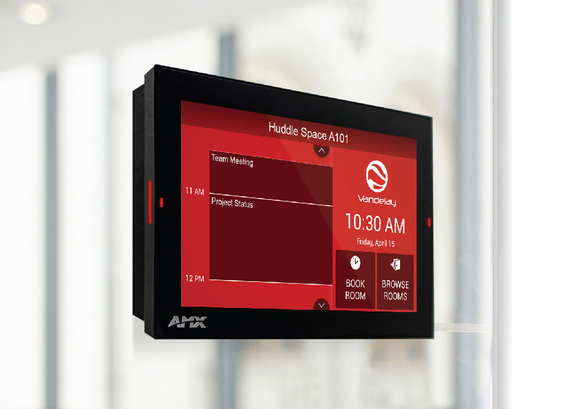
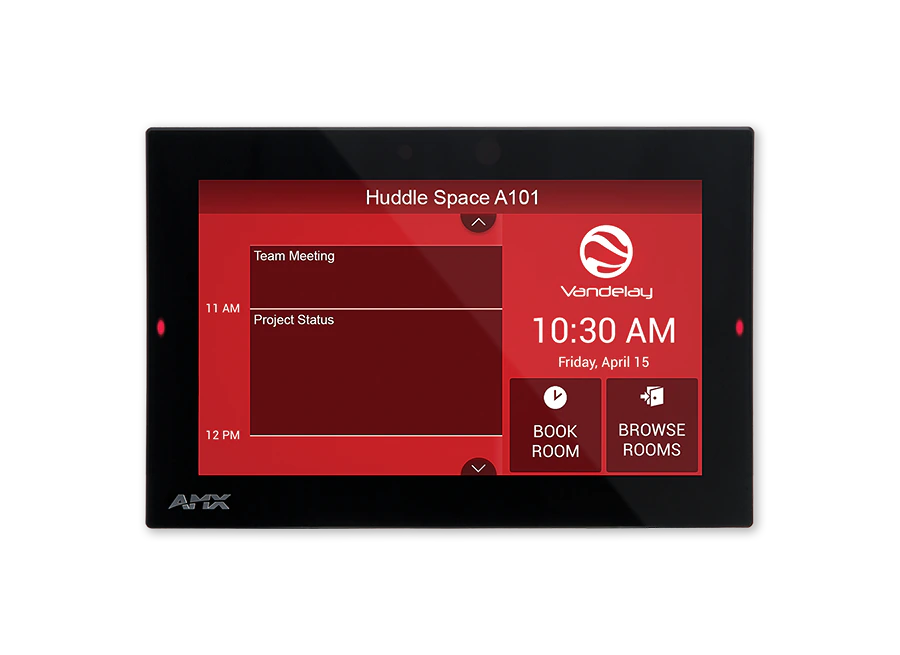
The Acendo Book 7" Touch Panel is a standalone scheduling panel that integrates directly with popular room scheduling software like Microsoft Exchange, Office 365, and Google Calendar without additional system hardware requirements. The user interface background color and built-in room availability bars change between red and green to show room availability so users can easily locate and book an available room directly from the panel and, if that room is currently booked, users can quickly locate the nearest available room or the next available time with ease.

Leveraging the style and cost-efficiency of our award winning Modero S Series Touch Panel, ACB-2107 includes SmoothTouch™ Technology, a brilliant full-color high-resolution display, wide viewing angle of screen and availability bar LEDs, and a low profile design for a subtle aesthetic. The ACB-2107 can be mounted on any flat surface, including glass or stone, inside or outside a conference room or classroom.

ACB-2107 is easy to install using a one-time, panel-based configuration wizard, to get the panel operational in a matter of minutes with minimal training.

상세 정보

Ideal for small/medium businesses wishing to optimize room utilization by implementing facility-wide room scheduling on a budget

비디오


다운로드

문서
  크기 업로드됨
file type icon Data Sheet
업데이트됨: 2026년 4월월
292KB 2026년 4월월
Manuals
  크기 업로드됨
3.91MB 2018년 7월월
CAD Drawings
  크기 업로드됨
108KB 2018년 4월월
1.16MB 2018년 4월월
Firmware
  버전 크기 업로드됨
1.1.22   159MB 2018년 8월월
download icon for Acendo Book (RMBK and ACB Panels) CloudworX Firmware Acendo Book (RMBK and ACB Panels) CloudworX Firmware
버전 1.3.49, 출시: 2019년 10월월
1.3.49   171MB 2019년 10월월
Quick Start Guides
  크기 업로드됨
238KB 2020년 10월월
Safety Sheets
  크기 업로드됨
5.15MB 2020년 10월월
Certifications
  크기 업로드됨
120KB 2018년 4월월
50.3KB 2018년 4월월
108KB 2018년 4월월

위의 링크 중 하나에서 브라우저에 이상한 문자가 표시되면, 파일을 마우스 오른쪽 버튼으로 클릭하여 컴퓨터에 저장하십시오.

기능

  • Standalone Scheduling Panel that's Quick and Easy to Install – Reduces cost by streamlining installation, simplifying configuration, and eliminating the need for a controller and monitoring software
  • Directly Integrates with Microsoft Exchange, Office 365 and Google Calendar – Synchronizes with the most popular scheduling platforms without additional software or configuration complications
  • Based on Modero S Hardware – Provides all the benefits of our most popular Modero S Scheduling Panels including award-winning industrial design, SmoothTouch™ Technology, and brilliant full-color display
  • On-Panel Room Booking – Quickly book available rooms directly from the panel
  • Diverse Mounting Options – Mount the panel virtually anywhere, including glass
  • Available Room Locator – Panel will suggest other currently available rooms at the push of a button
  • Availability Indicators on the Front and Sides of the Panel – 180 degree Visibility allows users to easily determine whether the room is currently available

사양

Display Size (WH) Landscape: 7.3" x 4.8" (186 mm x 122 mm), 8.8" (222 mm) diagonal
Viewable Area (WH) Landscape: 6.05" x 3.54" (154 mm x 90 mm), 7.0" (178 mm) diagonal
Resolution 1024x600
Viewing Angle Vertical: ± 89°, Horizontal: ± 89°
Aspect Ratio 16:9
Touch Overlay Resistive
Front Panel Components Sleep Button, Programmable Red/Green LEDs. See Data Sheet for details.
Power Consumption Full-On: 11 W maximum
FG Numbers FG4221-07

뉴스

HARMAN Professional Solutions:

ACB-2107
단종됨

7” Acendo Book Scheduling Touch Panel