| Video |
- Digital Video Input
- HDMI 2.0, DVI-D* (through adapter), Dual-Mode DisplayPort (DP++)*
*These signal types are supported through a passive adapter
- Analog Video Input: HD-15 VGA
- Video Output
- Network video over Ethernet via RJ45 port or SFP via 1G SFP+ port, HDMI, DVI-D*
*These signal types are supported through a passive adapter
- Formats
- HDMI 2.0, DVI-D (through adapter), Dual-Mode DisplayPort (DP++), HDCP 2.2 content protection support, RGBHV
- DVI-D and Dual-Mode DisplayPort (DP++) are supported through a passive adapter
- Progressive Input Resolutions
- Supports 4K30 4:2:0 and most common HD resolutions up to 1920x1200
- See NMX-ENC-N2312 Installation Manual for all supported resolutions
- HDMI and DVI (Progressive)
- Pixel clock between 27 MHz – 300MHz
- Minimum resolution of 720x480p60
- Maximum horizontal resolution of 4096 or a vertical resolution of 2160*
- Common acceptable resolutions include:
720x480p60 – 480p, 720x576@50, 800x600p60, 1024x768p60, 1280x720@60Hz - 720p60, 1600x1200@60Hz, 1920x1080@60Hz - 1080p60, 3840x2160(4:2:0)@30Hz - UHD30 aka 4K30, 4096x2160(4:2:0)@30Hz - DCI 4K30
- Interlaced Input Resolutions
- Supports 1080i60
- See NMX-ENC-N2312 Installation Manual for all supported resoltuions
- HDMI and DVI (Interlaced)
- 1920x1080@50Hz - 1080i50
- 1920x1080@60Hz - 1080i60
Note: Interlaced resolutions will be de-interlaced if scaled on the decoder; otherwise, the interlaced signal will pass through to the display
- Analog Input Resolutions
- Supports most common HD resolutions up to 1920x1200
- See NMX-ENC-N2312 Installation Manual for all supported resoltuions
- VGA
- Pixel clock between 27 MHz - 165 MHz
- Minimum resolution of 640x480
- Maximum horizontal resolution of 1920 or a vertical resolution of 1200
- Common acceptable resolutions include:
640x480p60, 720x480p60 – 480p, 720x576@50,800x600p60, 1024x768@60Hz, 1280x720@50Hz (720p50), 1280x720@60Hz (720p60), 1280x768@60Hz, 1280x800@60Hz, 1280x960@60Hz, 1280x1024@60Hz, 1360x768@60Hz, 1366x768@60Hz, 1400x1050@60Hz, 1440x900@60Hz, 1600x1200@60Hz, 1680x1050@60Hz, 1920x1080@50Hz (1080p50), 1920x1080@60Hz (1080p60), 1920x1200@60Hz (reduced blanking)
Note: Input resolutions supported @60Hz refresh rates are also supported @59.94Hz
The N2312 Encoder does not accept Composite or SVideo (YC)
- Analog-To-Digital Conversion: 8-bit 165 MHz per each of three color channels
- Color Space: 4:2:0 4K30, 4:2:2 – HD
- LocalPlay/HostPlay: 8 playlists
- HostPlay: 1 image/list
- Note: Jumbo Frames Required
- Video Wall Construction: Supported within the NMX-DEC-N2322, the N2300 Series is not compatible with SVSI Windowing Processors at this time
- Network Video Recording: Not compatible with SVSI NVR at this time
|
| Audio |
- Input Signal Types: Embedded audio on HDMI (DVI-D through adapter) or Analog Stereo (Balanced or Unbalanced)
- Output Signal Types: Ethernet, Embedded audio on HDMI or DVI-D (through adapter)
- HDMI Audio Formats: 8ch PCM
- Analog Audio Format: Stereo 2-channel
- Analog-To-Digital Conversion: 48 kHz
|
| Keyboard and Mouse |
Keyboard & Mouse: Connect the Decoder to the keyboard and mouse, and an N2300 Series Encoder to the PC being controlled |
| Latency |
- Latency
- 17-ms at 60 fps for 1920x1080 and lower resolutions
- 34-ms at 30 fps for 4K30
NOTE: This is the combined encode plus decode latency. Total latency from source to screen will also include any network latency. Scaling adds one frame of latency (17ms at 60fps)
- Switching: Up to 1.5s delay, not seamless
|
| Bandwidth |
- Bandwidth: Approximately 160 Mb/s
Note: Minimum bandwidth is 50 Mb/s for resolutions <= 1080p60 |
| Communications |
- Ethernet - PO
- 10/100/1000 Mbps, auto-negotiating, auto-sensing, full/half duplex, DHCP, Auto IP, and Static IP
- Ethernet - P1
- 1 Gbps port which accepts compatible fiber transceivers or direct attach cables, DHCP, Auto IP, and static IP
- HDMI: HDCP, EDID management
|
| Ports |
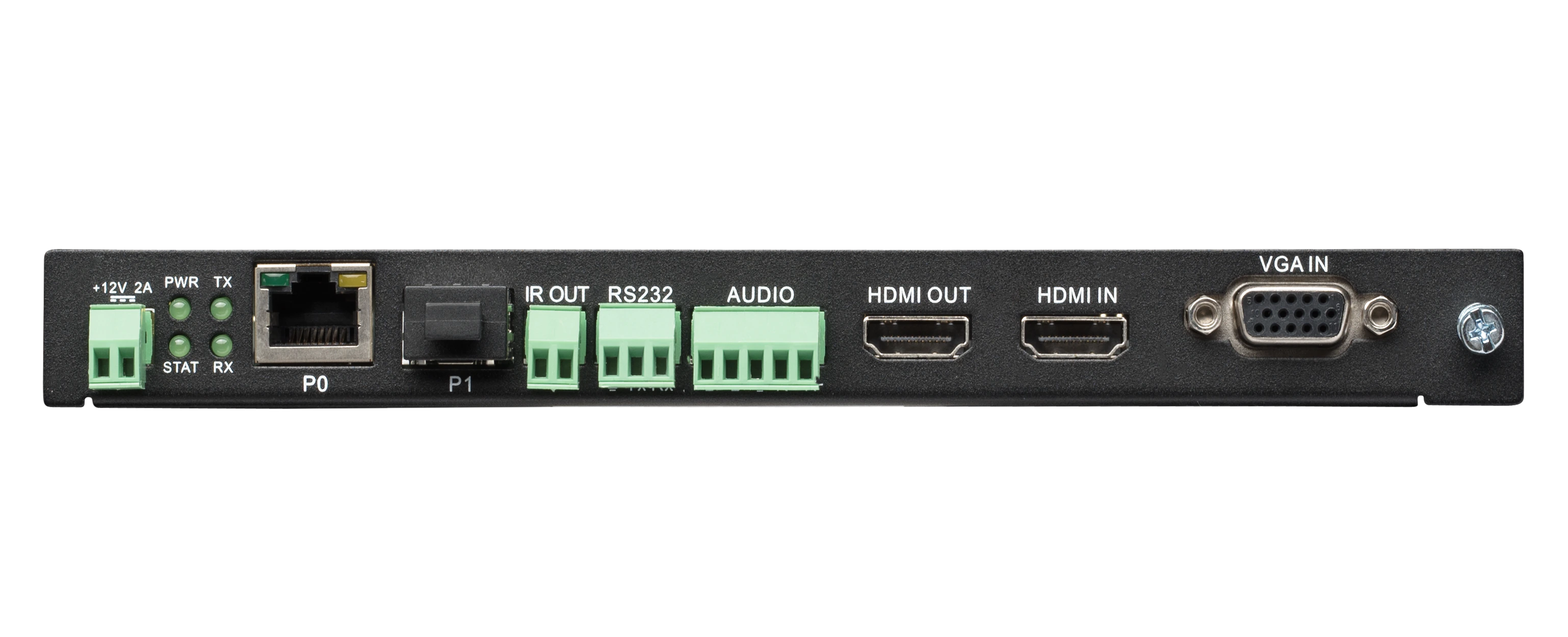
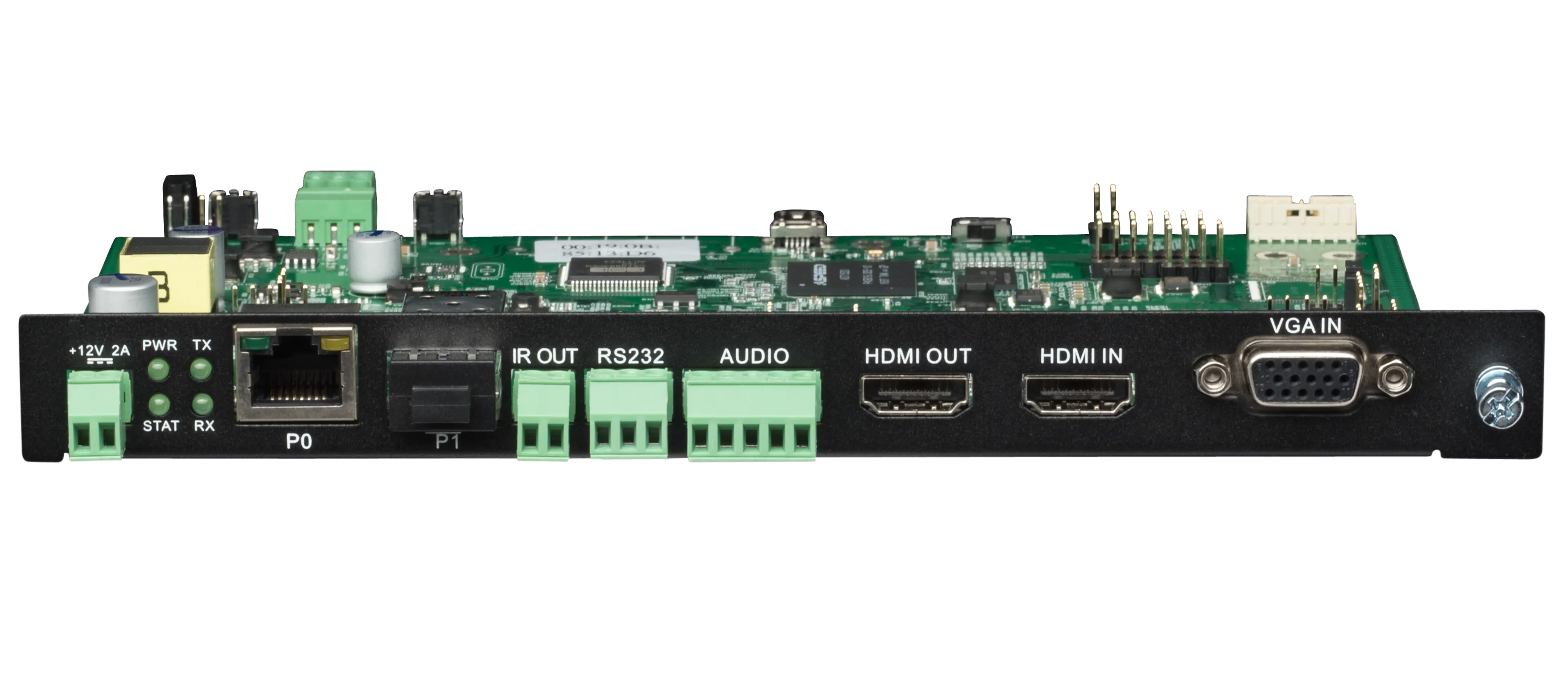
- +12V 2A: One 12 Volt DC power input
- PO
- 8-wire RJ45
- 10/100/1000 Mbps 10/100/1000Base-T auto-sensing gigabit Ethernet switch port
- Provides network connection, network AV video, and power to the Encoders and Decoders PoE power
- P1
- 1-Gbps SFP+ port (SFP+ fiber transceiver or direct attach cable not included)
- Provides network connection and networked AV video
- IR IN (front panel): 3-pin terminal Phoenix connector. Provides Infrared (IR) input only and passes signal back to connected decoder (33-60 kHz; typically 39 kHz) IR receiver is necessary (not included)
- IR OUT
- 2-pin terminal Phoenix connector
- Provides Infrared (IR) output only (33-60 kHz; typically 39 kHz). Emitter is necessary (not included)
- RS232
- 3-pin terminal Phoenix connector which provides a serial control interface. Full duplex communication.
- Available terminal speed settings: 1200-115200 baud rate
- AUDIO
- 5-pin terminal Phoenix connector which provides userselectable balanced/unbalanced input
- Dedicated audio input
- HDMI OUT: HDMI video output (passive pass-through from HDMI IN)
- HDMI IN: HDMI video input
- VGA IN: DB15 analog input
|
| Controls and Indicators - Front Panel |
- RESET Button
- Recessed pushbutton
- Press to initiate a 'warm restart' causing the processor to reset, but not lose power. A reset does NOT affect the current settings
- ID Button
- Recessed pushbutton
- Press to send a notification out on the network to identify the unit (the notification causes a pop-up dialog in N-Able and N-Command)
- POWER LED
- On solid (green) when operating power is supplied (via PoE or local power supply)
- This activity is also shown by the PWR LED on the rear panel
- STATUS LED
- On flashing (green) when there is software activity
- This activity is also shown by the STAT LED on the rear panel
|
| Controls and Indicators - Rear Panel |
- PWR LED: Same as POWER LED described above
- HDMI LED: On (green) when there is a connection to a valid HDMI source but will not light for VGA source
- STAT LED: Same as STATUS LED described above
- STRM LED: On (green) when the unit is streaming video
- FAN: None
|
| Environmental |
- Temperature: 32° to 104°F (0° to 40°C)
- Humidity: 10% to 90% RH (non-condensing)
- Heat Dissipation: Up to ~44 BTU/hr
|
| General |
- Mounting Options
- Regulatory Compliance: FCC, CE, and NTRL
- Recommended Accessories NMX-ACC-N9206 (FGN9206), 2RU Rack Mount Cage with Power for Six SVSI N-Series Card Units
|
| FG Numbers |
FGN2312-CD |






 컨설턴트 지원