RMBK-701
Eingestellt

7” AMX RoomBook Scheduling Touch Panel

RMBK-701_Front
Größere Bilder

Ersatzprodukte

  • ACB-2107

    ACB-2107

    7" Acendo Book Scheduling Touch Panel

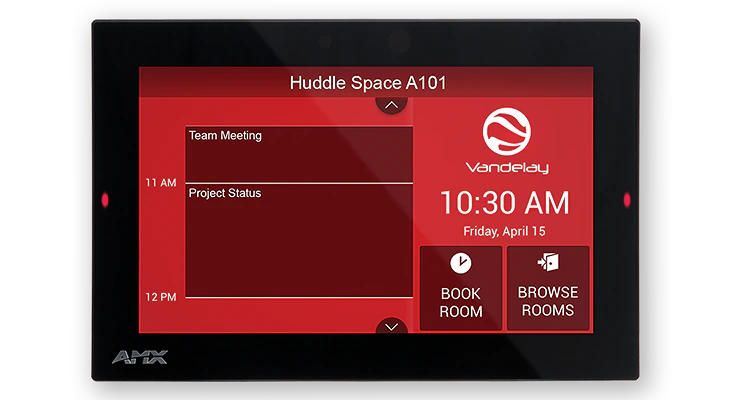
The AMX RoomBook 7" Touch Panel is a standalone scheduling panel that integrates directly with popular room scheduling software like Microsoft Exchange, Office 365, and Google Calendar without additional system hardware requirements. The user interface background color and built-in room availability bars change between red and green to show room availability so users can easily locate and book an available room directly from the panel and, if that room is currently booked, users can quickly locate the nearest available room or the next available time with ease.

Leveraging the style and cost-efficiency of our award winning Modero S Series Touch Panel, RMBK-701 includes SmoothTouch™ Technology, a brilliant full-color high-resolution display, wide viewing angle of screen and availability bar LEDs, and a low profile design for a subtle aesthetic. The RMBK-701 can be mounted on any flat surface, including glass or stone, inside or outside a conference room or classroom.

RMBK-701 is easy to install using a one-time, panel-based configuration wizard, to get the panel operational in a matter of minutes with minimal training.

Mehr Details

Ideal for small/medium businesses wishing to optimize room utilization by implementing facility-wide room scheduling on a budget

Downloads

Dokumente
  Größe Hochgeladen
file type icon Data Sheet
aktualisiert: Apr 2026
284 KB Apr 2026
BIM Objects
  Größe Hochgeladen
file type icon RMBK-701 - BIM Object
aktualisiert: Aug 2019
Aug 2019
Firmware
  Version Größe Hochgeladen
download icon for AMX RoomBook and AMX Acendo Book Scheduling Touch Panels Firmware AMX RoomBook and AMX Acendo Book Scheduling Touch Panels Firmware
Version 1.1.22, veröffentlicht: Aug 2018
1.1.22   159 MB Aug 2018
download icon for Acendo Book (RMBK and ACB Panels) CloudworX Firmware Acendo Book (RMBK and ACB Panels) CloudworX Firmware
Version 1.3.49, veröffentlicht: Okt 2019
1.3.49   171 MB Okt 2019

Falls einer der obigen Links zu seltsamen Zeichen in Ihrem Browser führt, klicken Sie bitte mit der rechten Maustaste auf die Datei, um sie auf Ihrem Computer zu speichern.

Eigenschaften

  • Standalone Scheduling Panel that's Quick and Easy to Install – Reduces cost by streamlining installation, simplifying configuration, and eliminating the need for a controller and monitoring software
  • Directly Integrates with Microsoft Exchange, Office 365 and Google Calendar – Synchronizes with the most popular scheduling platforms without additional software or configuration complications
  • Based on Modero S Hardware – Provides all the benefits of our most popular Modero S Scheduling Panels including award-winning industrial design, SmoothTouch™ Technology, and brilliant full-color display
  • On-Panel Room Booking – Quickly book available rooms directly from the panel
  • Diverse Mounting Options – Mount the panel virtually anywhere, including glass
  • Available Room Locator – Panel will suggest other currently available rooms at the push of a button
  • Availability Indicators on the Front and Sides of the Panel – 180 degree Visibility allows users to easily determine whether the room is currently available

Spezifikationen

Display Size (WH) Landscape: 7.3" x 4.8" (186 mm x 122 mm), 8.8" (222 mm) diagonal
Viewable Area (WH) Landscape: 6.05" x 3.54" (154 mm x 90 mm), 7.0" (178 mm) diagonal
Resolution 1024x600
Viewing Angle Vertical: ± 89°, Horizontal: ± 89°
Aspect Ratio 16:9
Touch Overlay Resistive
Front Panel Components Sleep Button, Programmable Red/Green LEDs. See Data Sheet for details.
Power Consumption Full-On: 11 W maximum
FG Numbers FG2265-37
HARMAN Professional Solutions:

RMBK-701
Eingestellt

7” AMX RoomBook Scheduling Touch Panel