RMBK-1001
Arrêté

10.1” AMX RoomBook Scheduling Touch Panel

Grandes images

Produits de substitution

  • ACB-2110

    ACB-2110

    10.1” Acendo Book Scheduling Touch Panel

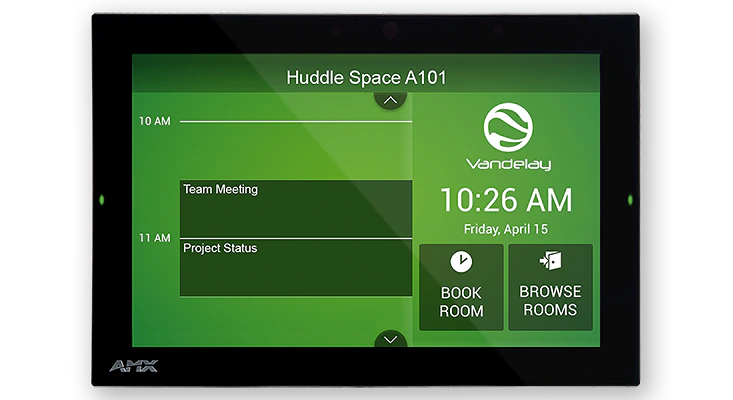
The AMX RoomBook 10.1" Touch Panel is a standalone scheduling panel that integrates directly with popular room scheduling software like Microsoft Exchange, Office 365, and Google Calendar without additional system hardware requirements. The user interface background color and built-in room availability bars change between red and green to show room availability so users can easily locate and book an available room directly from the panel and, if that room is currently booked, users can quickly locate the nearest available room or the next available time with ease.

Leveraging the style and cost-efficiency of our award winning Modero S Series Touch Panel, RMBK-1001 includes SmoothTouch™ Technology, a brilliant full-color high-resolution display, wide viewing angle of screen and availability bar LEDs, and a low profile design for a subtle aesthetic. The RMBK-1001 can be mounted on any flat surface, including glass or stone, inside or outside a conference room or classroom.

RMBK-1001 is easy to install using a one-time, panel-based configuration wizard, to get the panel operational in a matter of minutes with minimal training.

plus de détails

Ideal for small/medium businesses wishing to optimize room utilization by implementing facility-wide room scheduling on a budget

Téléchargements

Documents
  Taille Téléchargé
file type icon Data Sheet
mis à jour : avr. 2026
284 ko avr. 2026
CAD Drawings
  Taille Téléchargé
278 ko oct. 2020
1,86 Mo oct. 2020
BIM Objects
  Taille Téléchargé
file type icon RMBK-1001 - BIM Object
mis à jour : août 2019
août 2019
Firmware
  Version Taille Téléchargé
1.1.22   159 Mo août 2018
download icon for Acendo Book (RMBK and ACB Panels) CloudworX Firmware Acendo Book (RMBK and ACB Panels) CloudworX Firmware
version 1.3.49, publié : oct. 2019
1.3.49   171 Mo oct. 2019
Quick Start Guides
  Taille Téléchargé
796 ko mars 2018

Si l'un des liens ci-dessus affiche des caractères étranges dans votre navigateur, faites un clic droit sur le fichier pour l'enregistrer sur votre ordinateur.

Caractéristiques

  • Standalone Scheduling Panel that's Quick and Easy to Install – Reduces cost by streamlining installation, simplifying configuration, and eliminating the need for a controller and monitoring software
  • Directly Integrates with Microsoft Exchange, Office 365 and Google Calendar – Synchronizes with the most popular scheduling platforms without additional software or configuration complications
  • Based on Modero S Hardware – Provides all the benefits of our most popular Modero S Scheduling Panels including award-winning industrial design, SmoothTouch™ Technology, and brilliant full-color display
  • On-Panel Room Booking – Quickly book available rooms directly from the panel
  • Diverse Mounting Options – Mount the panel virtually anywhere, including glass
  • Available Room Locator – Panel will suggest other currently available rooms at the push of a button
  • Availability Indicators on the Front and Sides of the Panel – 180 degree Visibility allows users to easily determine whether the room is currently available

Caractéristiques techniques

Display Size (WH) 9.1" x 5.9" (230 mm x 149 mm), 10.8" (274 mm) diagonal
Viewable Area (WH) 8.5" x 5.4" (217 mm x 136 mm ), 10.0" (256 mm) diagonal
Resolution 1280x800
Viewing Angle Vertical: ± 85°, Horizontal: ± 85°
Aspect Ratio 16:9
Touch Overlay Resistive
Front Panel Components Sleep Button, Programmable Red/Green LEDs. See Data Sheet for details.
Power Consumption Full-On: 14.5 W (max)
FG Numbers FG2265-40