MD-702 Acendo Book

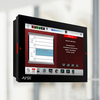
AMX Acendo Book 7” Scheduling Touch Panel

ACB-2107_original
รูปภาพขนาดใหญ่

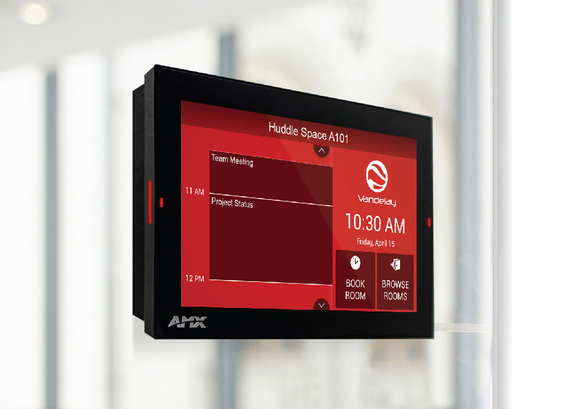
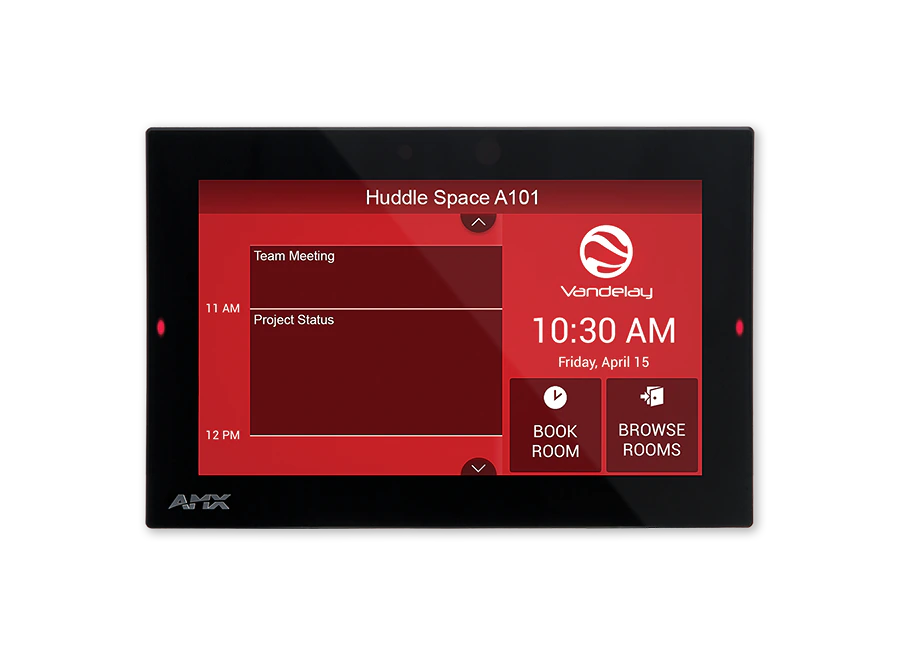
The second-generation Acendo Book 7" Touch Panel is a scheduling panel that integrates with popular room scheduling software like Microsoft Exchange, Office 365, and Google Calendar. The user interface background color and built-in room availability bars change between red and green to show room availability so users can easily locate and book an available room directly from the panel and, if that room is currently booked, users can quickly locate the nearest available room or the next available time with ease.

Featuring a capacitive touch screen, powerful Quad-Core processor, and a low profile design for a subtle aesthetic, Acendo Book can be mounted on any flat surface, including glass or stone, inside or outside a conference room or classroom. For added flexibility, the 7” touch panel can be deployed as a Modero G5 control panel or an Acendo Book scheduling panel using a built-in configuration tool—no additional software, programming or cost is required.

รายละเอียดเพิ่มเติม

  • Ideal for businesses of all sizes wishing to optimize room utilization by implementing facility-wide room scheduling.
  • The MD-702 can be used as a scheduling panel for meeting rooms and auditoriums 

การดาวน์โหลด

Manuals
  ขนาด อัปโหลดแล้ว
3.91 เมกะไบต์ ก.ค. 2018
CAD Drawings
  ขนาด อัปโหลดแล้ว
file type icon Pictorial Drawing - MD-702 (PDF)
อัปเดต: ต.ค. 2020
97.4 กิโลไบต์ ต.ค. 2020
Firmware
  เวอร์ชัน ขนาด อัปโหลดแล้ว
download icon for Acendo Book (MD Panels) Firmware Acendo Book (MD Panels) Firmware
เวอร์ชัน 2.0.0, เผยแพร่: ม.ค. 2024
2.0.0   289 เมกะไบต์ ม.ค. 2024
Quick Start Guides
  ขนาด อัปโหลดแล้ว
file type icon Quick Start Guide Guide - MD-702
อัปเดต: ต.ค. 2020
766 กิโลไบต์ ต.ค. 2020
Data Sheets
  ขนาด อัปโหลดแล้ว
file type icon MD-702 - Data Sheet
อัปเดต: ก.ย. 2019
442 กิโลไบต์ ก.ย. 2019

หากลิงก์ใดด้านบนแสดงตัวอักษรแปลกๆ ในเบราว์เซอร์ของคุณ โปรดคลิกขวาที่ไฟล์เพื่อบันทึกไว้ในคอมพิวเตอร์ของคุณ

คุณสมบัติ

  • Capacitive Touch Screen – A fast and flawless touch screen that enhances screen durability, smudge and scratch resistance
  • Flexible – Transform Acendo Book into a Modero G5 control interface using a built-in configuration tool – no programming or additional hardware required
  • Quad-Core Processor – Fast and responsive user interface
  • Secure – Updated firmware provides 802.1x and IPv6 availability
  • On-Panel Room Availability Indicators on the Front and Sides of the Panel – Side-panel LED indicators to allow users to easily determine when a room is available
  • Scheduling Panel that's Quick and Easy to Install – Reduces cost by streamlining installation, simplifying configuration, and eliminating the need for a controller or programming
  • Acendo Book integrates and synchronizes with the most popular scheduling platforms, including Microsoft Exchange, O365, and Google Calendar. Book panel can connect directly to RMS for installations that require Modern Authentication
  • Available Room Locator – Panel will suggest other currently available rooms at the push of a button
  • Diverse Mounting Options – Mount the panel virtually anywhere, including glass
  • On-Panel Room Booking – Quickly book available rooms directly from the panel

ข้อมูลจำเพาะ

Display Size (WH) Landscape 7.3" x 4.8" (186 mm x 122 mm), 8.8" (222 mm) diagonal
Viewable Area (WH) Landscape 6.05" x 3.54" (154 mm x 90 mm), 7.0" (178 mm) diagonal
Resolution 1024x600
Touch Overlay Capacitive
FG Numbers FG5969-55BL
Supported Scheduling Systems

Microsoft Exchange, Microsoft Office 365, Google Calendar

Modern Authentication support requires RMS. For more information about Acendo Book and Modern Authentication, visit https://help.harmanpro.com/modern-authentication-for-acendobook-roombook-panels

ข่าว